The Making of'It's Always Sunny Around Here'Chapter 1: First Draft and First Edit
To read this making-of guide as a downloadable ebook, click here for the EPUB and click here for the Kindle version (AZW). To look at and/or buy the book being discussed, head over to Amazon.
(Click here for the Microsoft Word version of this first edit, with “track changes” still on. Click on any of the images below for the full-sized version.)
I tend to stick to the fundamentals when it comes to the basics of any step of the self-publishing process; so when it comes to the first draft of a manuscript, I tend to adhere to the well-known advice of not being self-conscious yet of it as a finished piece of work, but to just write loosely and off the top of your head concerning whatever it is that comes to mind. As you’ll see more and more in the coming chapters, successful self-publishing involves playing multiple roles during various steps of the process, and having to turn off all the other roles whenever you’re deeply into one in particular; and here in the first draft is when your role is most dedicated to simply being an artist, and being free and creative and taking chances, just blabbing on and on about something as much as you want, and sometimes not making sense and ending it with, “I know I’m not making sense.” That’s how I wrote my daily journal back that summer and fall, just going as long or as short as I felt like on any given day, and not worrying about whether I was repeating myself a ridiculous amount from one day to the next (which I was).
I stopped the daily updates at the beginning of October 2025, then did one last concluding mega-entry at the beginning of November; and then I didn’t touch it or look at it again until all the way in March 2026, four months later. This is another fundamental piece of advice; that once you’re done with a first draft, put it away for a while, out of sight and out of mind. It not only makes you saner, but it lets you reapproach the draft with fresh eyes when it comes time to switch roles for the first time, and now become the book’s editor. As a freelance editor, I of course strongly advise you to hire a freelance editor if you can afford it; but for the purposes of these books I self-publish, the goal is to do it as cheaply as possible, ideally with a staff of just you for an upfront budget of zero, quite literally creating something of monetary value out of nothing but your creativity and time.
That meant that here I had to serve as my own editor; but since I’m an editor for a living, I had an advantage here, because I know exactly how an editor acts. So let this be a little tutorial on the important things that you can do when it comes to being your own editor yourself, the first and most important of which is that you should now think of yourself as an entirely new person, not the person who wrote the book but the person who’s been handed the book afterwards and paid money to make it better. This is no longer your baby, and you’re no longer the parent; once you become the book’s editor, this is instead your assignment, and the parent is your client.
That means, for example, that it’s your job to be brutally honest with your client about the manuscript’s weak points, because this is literally why they’re paying you, because their friends and family are too nice to point it out themselves. You have to look at it...not coldly, but with the eyes of a stranger who has no personal stake in it, who’s simply looking for a good read and doesn’t want to put up with a book that has a lot of problems. You can be compassionate with yourself, but it’s also Editor You’s job to be honest with Author You, and to get their manuscript as close to a perfect shape as possible before it starts landing in audience members’ hands. That’s why you’re getting paid the big bucks, after all.
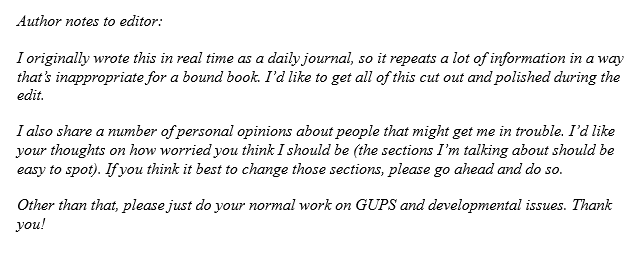
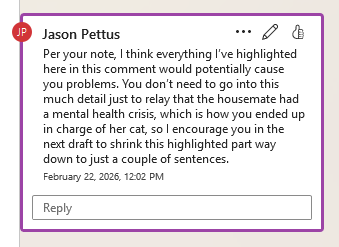
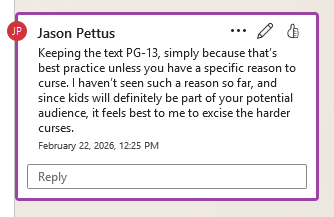
Ideally you do a developmental edit first, which is a “high-level” (think intellectual) edit that targets only “big picture” issues. For fiction, that might include the characters, the plot, the logic, the dialogue, the personal style, and more; for nonfiction that might include the length of each section, the pace of each section, the logic of each section, the order of the sections, etc. Do this exactly like how you might with an actual outside freelance editor; have Author You write Editor You some notes right on the document’s front page about some of the developmental issues you’ll hope they’ll get into. In my case, for example, in my first draft I go on for some length about the mental health issues of the cat’s previous owner who abandoned him, and I explicitly ask Editor Jason, “Do you think I’m going too far here, or that my readers will find this level of detail distasteful?”
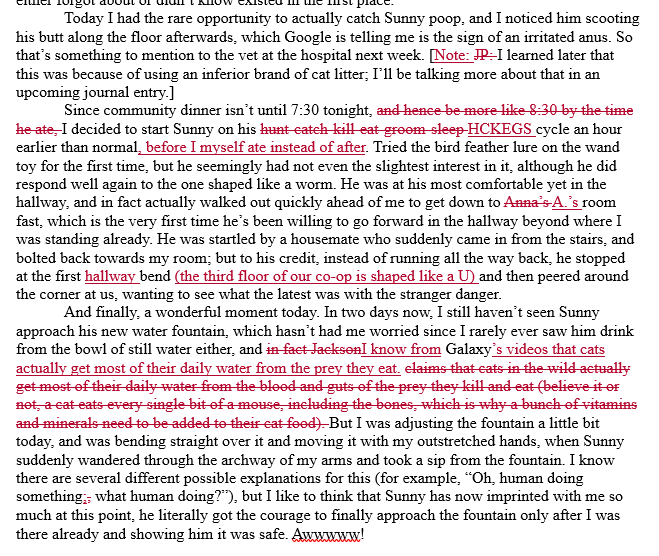
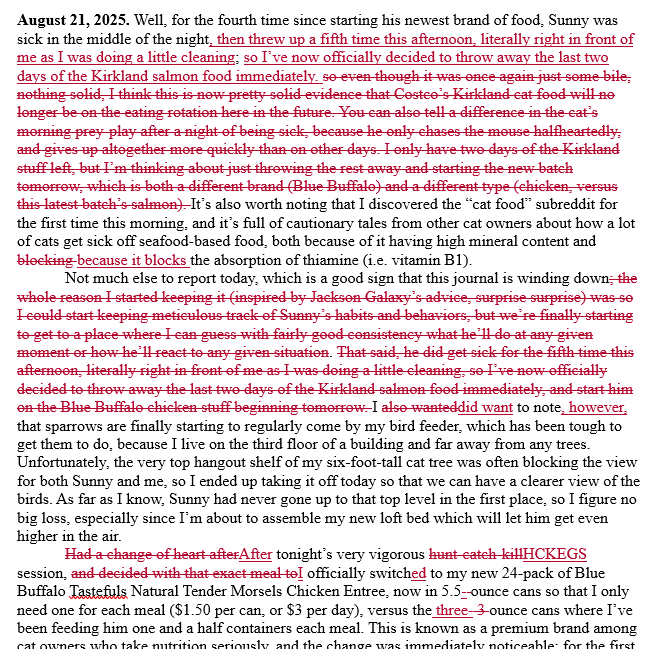
After this, ideally you do a copy edit, which is when you do a close-in, detailed look at all the manuscript’s technical issues when it comes to what my industry calls GUPS, or grammar, usage, punctuation, and spelling. This is where things get complicated when it comes to online discussions about book editing, as I’m sure some of you already know, because different editors have different ideas about how this work breaks down and what it should be called. For example, “usage” here in plain language means “how you’re using English in your sentences and paragraphs;” so when I offer a client copy editing, as part of that I make suggestions for rewording sentences to read better, reordering paragraphs to flow better, etc. Other editors, however, give this usage help the special names of “line edits” (for sentences) and “structural edits” (for paragraphs), and charge an additional fee on top of the simpler “copy edit” only for grammar, punctuation, and spelling. If you’re doing this for yourself, though, of course you’ll be doing like me and lumping it all into the general “copy edit” category, because it all has to eventually get done one way or the other.
I keep saying “ideally” here because in my case with Sunny, I ended up doing both the developmental and copy edit at the same time; I did this because I knew I wasn’t going to have many developmental notes, and I did this because I’m a full-time professional editor for a living, so when I’m working on my own projects, I can fly through this stuff fairly fast. Also, let me admit that I did the GPS part of GUPS here (the grammar, the punctuation, and the spelling) manually on my own too, simply because I do it every day as an editor of other people’s manuscripts; but that if I was just a normal everyday author out there, and it came to the fairly simple, fairly cut-and-dried rules of grammar, punctuation, and spelling, as heretical as this might sound, maybe an automated AI-assisted service like Grammarly isn’t actually that bad for the GPS of GUPS. That leaves the U, otherwise known as the sentences and paragraphs; and this is where the truly human part of copy editing really kicks in, because the sentences and paragraphs are where the art lies, where it is that we differentiate an okay book from a great book. Never do this part with software or an AI bot; always take on the usage with only your human brain and ten human fingers.
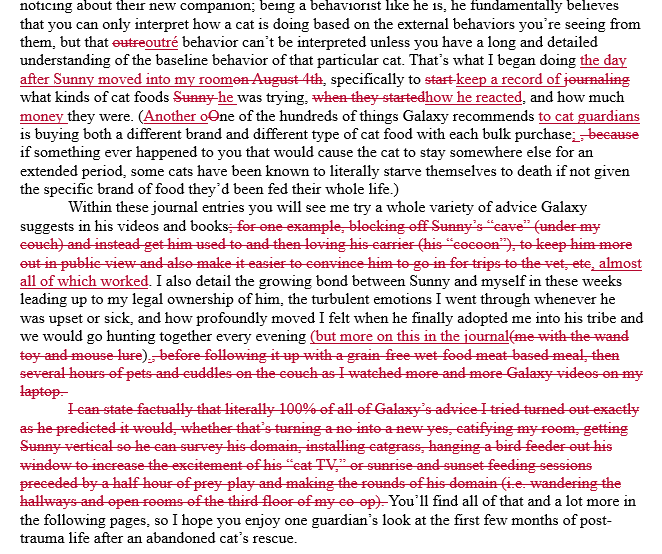
Whatever the case and however you go about it, from a practical standpoint you will most likely be outputting this edit as a Microsoft Word file (or one of its clones like Google Docs or Open Office), and with “track changes” turned on. This feature does exactly what its name implies; it tracks every change the editor suggests should happen in this manuscript, but instead of actually making the changes right away, it features the suggestions as red text that hasn’t been implemented yet. The author, then, can very carefully go through them one at a time, manually clicking “accept” or “reject” for each one; or if you’re editing yourself like here, and know in advance that you’re going to agree with every suggestion you made for yourself about a manuscript you wrote (duh), you can simply click “accept all” and resolve the entire thing at once.
During a lot of this self-publishing journey, you will see me extol the virtues of educating yourself on the software of publishing as much as possible, so that you can be a smartie and do all these steps yourself instead of shelling out big bucks to someone to do it for you; and I admit that my 30+ years of using this class of software (all the way back to Quark XPress 3 in 1991) is one of the main reasons I’ve been able to be a publisher over the years in the first place. When it comes to that, let this be the first place in the publishing process where I do such extolling, and simply urge you to become as much as an expert as you can on Word and especially its track changes feature. There are two halves to self-publishing—the writing half and the designing half—and you will be doing almost 100 percent of the writing half in Word (or Google Docs, or Open Office), so you owe it to yourself to learn this surprisingly powerful software (it has its own programming language and everything) as well as you possibly can.
Okay, done? Time to turn it back to your client, Author You, who now reviews your thoughts, implements the changes they agree with, and readies the manuscript for a second edit. We’ll look at all that in the next chapter.