The Making of'It's Always Sunny Around Here'Chapter 6: Post-Production Proofread
To read this making-of guide as a downloadable ebook, click here for the EPUB and click here for the Kindle version (AZW). To look at and/or buy the book being discussed, head over to Amazon.
(Click here for a downloadable Microsoft Word version of the entire proofreading report being discussed below. Click on the image to see the full-sized version.)
A quickly printed example of how the final paperback version of your book will look is known as a “proof,” as in literally proof of what the finished book will look like. This is how we get the general term “proofread,” as basically the very last look at the book while there’s still a chance to change details, before the book is finally sent out to a paying public. In the self-publishing process, this is specifically known as a “post-production proofread,” to emphasize that it’s happening after the layout of the book is entirely finished, and with the proofread consisting not just of the manuscript itself (like all the other edits so far of this book), but the design elements of the finished physical book, such as the title page, the copyright page, the headers and footers, the page numbers, and every other element that makes up the finished paperback.
In the Bad Old Times, authors and editors needed to wait for one of these proofs to be physically mailed from the printing plant to their publishing offices; but in our modern age, a PDF will do just fine, because it’s literally a PDF you’ll be sending to the printing plant anyway. There now exists multiple ways to actually mark up such a PDF, including a tool made by Adobe itself that allows you to add comments directly to specific places on the page; but for old-skoolers like me (or those who don’t wish to add yet another piece of software to this process), the tried and true method for proofreading a PDF is to simply create a table in a separate Word document, with three columns for each row that denote the page number where the error occurs, the actual text that’s wrong, and what the text should be changed to.
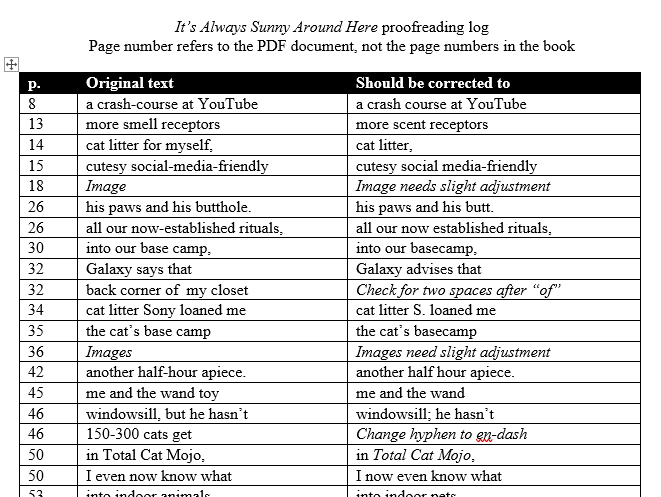
It’s best practice here that you note the page number of the PDF document itself, not whatever page number might appear at the bottom of that paperback’s page; for one big thing, the front matter of a book typically doesn’t get page numbers at all, so in that case you will literally need the PDF page number in order to specify what page you’re exactly talking about. Similarly, it’s typical to quote three or four words around the error when writing down when a change needs to take place; this is for the benefit of Designer You, who will be scanning that page with their human eyes on the hunt for the error.
It’s then Designer You’s job to actually incorporate all these last changes to the graphic design file, whether that’s in Affinity or another piece of software. Don’t forget to make the changes in the original Word file as well; and if you want to be as thorough as possible, you should even go to the trouble of making a brand-new copy of the Word file before instituting these last changes, so that you have a nice clear record of every round of work this manuscript went through, and can go back and refer to each specific step if there are ever any problems or questions. (Ideally you should end up with 20, 30, or even more computer files by the time the self-publishing process is over, whether that’s the various Word edit rounds, the graphic design files, the images you’re embedding within that book, the final PDFs you’ll be sending to the printing plant, etc.; but since files of this type are so small in memory, there’s really no reason not to do this.)
By the way, this is an excellent place to get your friends and family involved, especially the ones who have been insisting, “Just let me know if there’s anything I can do to help!” It doesn’t take any kind of special training just to dig out missing punctuation marks, or places where a character says “to” when they meant to say “too;” and meanwhile, final typos are one of those weird tricky things where a certain set of eyes might look at one a hundred times and never notice it, so having a “fresh set of eyes” for the proofreading can and does make a real difference in the manuscript’s final quality.
Done? Then next comes the step that on the surface looks like it’s going to be the easiest, but in fact sometimes turns out to be the trickiest of all, taking that revised Word document and converting it into the ebook version of your title. We’ll examine that often long and infuriating process in the next chapter.